CNC24 Service Platform
The product
CNC24 Service is a comprehensive web-based platform for managing the full lifecycle of CNC machine service requests — from customer registration and machine management through to service requests, quoting, ordering, technician dispatching, and service reporting. The platform serves multiple user types across the industrial machinery sector, with a strong focus on German-speaking markets (DE/EN bilingual interface).
My role
I was responsible for the full UX and UI design of the platform — translating complex, technical service workflows into a clear and intuitive web application. I collaborated closely with project managers, IT support staff, and field technicians throughout the process, ensuring the design aligned business goals with real-world operational needs while remaining technically feasible.

The Challenge
Complex workflows, multiple user types
The platform serves fundamentally different user roles — customers (company admins), field technicians, and internal service administrators — each operating in very different contexts and with completely different needs. A customer needs to report a machine breakdown quickly and track its resolution. A technician needs to log work, create service reports, and manage jobs in the field. An admin needs full oversight of all open requests, offers, and orders.
The core UX challenge was to design a unified system that handles this complexity without overwhelming any single user type, while maintaining a consistent and professional visual language throughout.
Research
Stakeholder interviews
Research was conducted through stakeholder interviews with project managers and technical teams who had deep knowledge of the existing service workflows. These conversations revealed the key pain points: the previous process was largely manual and fragmented — service requests were handled via email and phone, offers were sent as PDF attachments, and there was no centralised way to track machine history or technician assignments.
From these insights, I developed user personas that guided all major design decisions — particularly around information hierarchy and the structure of the service request flow.
Key Design Decisions
1. Role-based navigation and views
The platform has distinct interfaces for different user roles — customers see Machines, Service Requests, Offers, Library, and Shop; technicians see Order Management, Service Portal, FAQ Database, and Planning Board; admins have full access including the Admin Portal and customer management. Navigation is kept minimal and icon-based, ensuring fast orientation regardless of role.
Key Modules
Customer Registration
Machine Management
Service Requests
Offers & Orders
FAQ Database
Service Reports
Technician Management
Admin Portal
Company Profile
Team
Developers
PMs
IT Support
Field Technicians
User Modules Designed:
Customer
Field Technician
Service Admin
CNC24 Admin
2. Machine management with split-panel preview
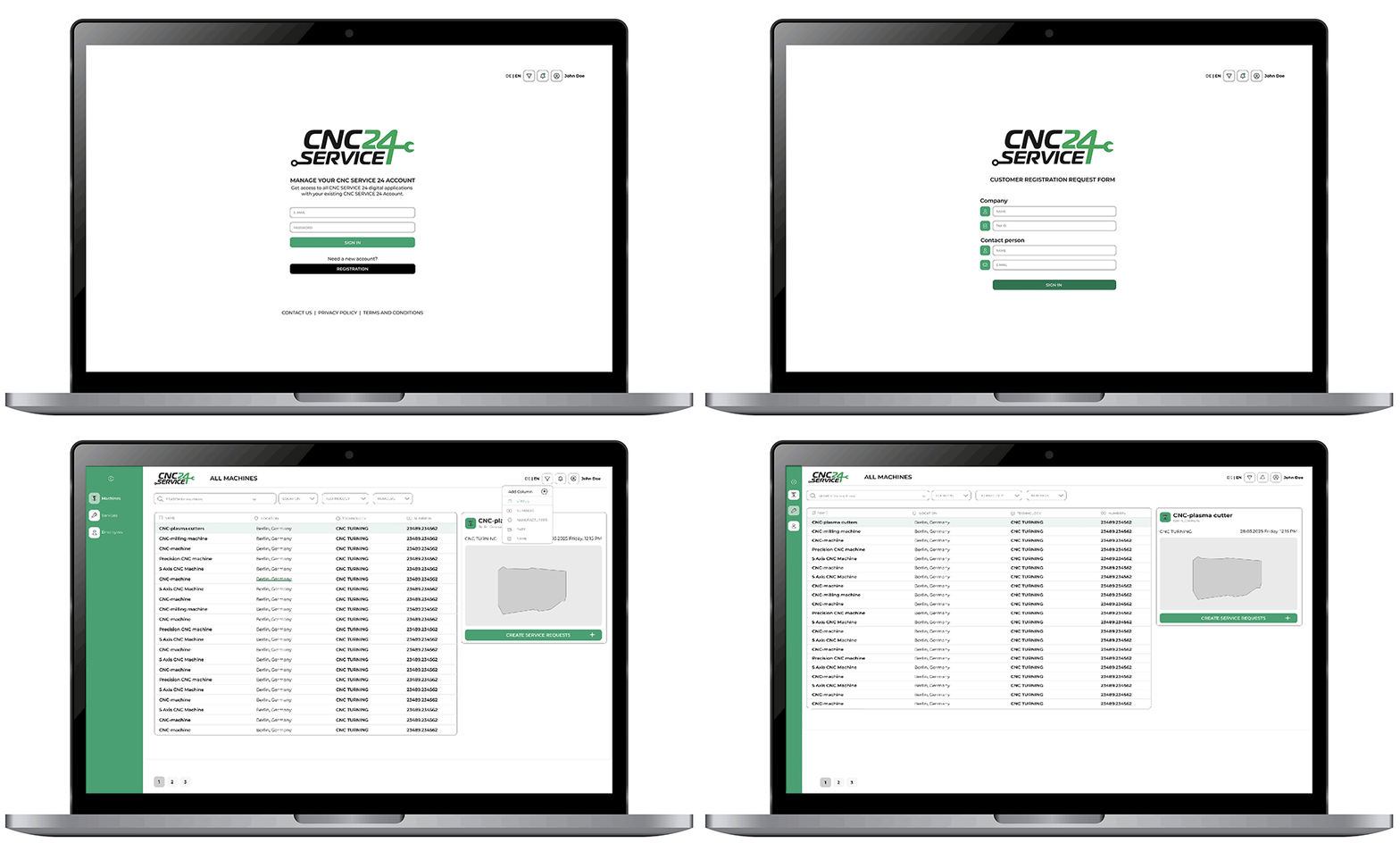
The machine list uses a split-panel layout — selecting a row immediately shows a machine preview panel on the right (with photo, location, and a direct "Create Service Request" CTA), without leaving the list context. Users can also toggle between list and tile views, filter by manufacturer and location, and customise visible columns. This keeps power users efficient while remaining accessible to occasional users.
3. Service request form — structured and scannable
The service request form is designed as a single-page layout with clear zones: machine selection (left), problem details (centre), and classification (right). Machine status and fault cause are captured via checkboxes rather than free text, ensuring consistent data for downstream processing. Contact persons can be added inline via a modal. The form also surfaces the related Communication, Offers, Jobs, and Spare Parts tabs — giving full context without navigating away.
4. Status-driven offer and order tracking
Service requests and offers use a colour-coded status badge system — Open (grey), Accepted (green), Ordered (orange/yellow), Delivered (blue), Closed — allowing users to assess the state of all items at a glance. The status counts are also surfaced as filter tabs at the top of the list, so users can instantly jump to items requiring their attention.
5. FAQ Database for technicians
Technicians have access to a searchable knowledge base of past service cases, filterable by machine manufacturer, control manufacturer, product group, machine type, and free-text search term. Each result expands to show the original customer message and the documented repair solution. This allows technicians to quickly find precedents for similar problems — reducing diagnostic time in the field.
6. Service report with structured sections
Technicians complete service reports through a structured, collapsible-section layout — Header Information (customer, machine, technician, contact, production info), Problems and Solutions (free text), Cost Items (article, quantity, unit price, discount), Work Log (date, hours, km, accommodation), and Footer (machine status before/after, follow-up required). The work log supports multiple daily entries, making multi-day jobs straightforward to document.
7. Customer registration and onboarding
New customers register via a clean, focused registration form (company name, tax ID, contact person, email). Once onboarded, they manage their company profile, locations, machines, and users from a unified Service Portal — including financial settings (VAT, payment terms, billing and shipping addresses).


